

Sync YouTube ▶️ Videos to Notion in One Click
Organize and back up your liked videos and playlists to Notion. Automatically grab full transcripts, distill key takeaways with AI, and let new videos sync incrementally on their own—no extra clicks required.
 Add to Chrome
Works on Chrome and Edge. Not available on mobile.
A Sync Tool Built for Heavy YouTube Viewers
Reliable sync, zero hassle—just watch and organize. Turn your YouTube videos into a Notion knowledge base.
Browser Extension
Youtube2Notion works on Chrome and Edge desktop browsers only. It is not available on mobile.
Multi-Account Support
Switch YouTube accounts in your browser and the extension automatically fetches and syncs the new account's liked videos and playlists, keeping each account's progress separate.
AI Summaries
While grabbing the full transcript, AI automatically distills a content summary, key-point outline, and standout quotes in the video's original language—helping you grasp the essence of a long video in minutes.
Full Transcripts
Automatically capture the video's complete subtitle transcript into your Notion page. Combined with AI summaries, it makes video content searchable, reviewable, and ready to repurpose.
Automatic Incremental Sync
Set it once and it just works. Newly liked videos and fresh playlist additions sync automatically—no manual steps, with precise deduplication so nothing is added twice.
Full Content & Embedded Playback
Title, channel, view count, publish date, description, thumbnail, and #hashtags all sync together, with an embedded YouTube player right inside your Notion page for instant playback.
See the Sync in Action
See how YouTube videos sync completely into Notion, keeping every important detail intact.
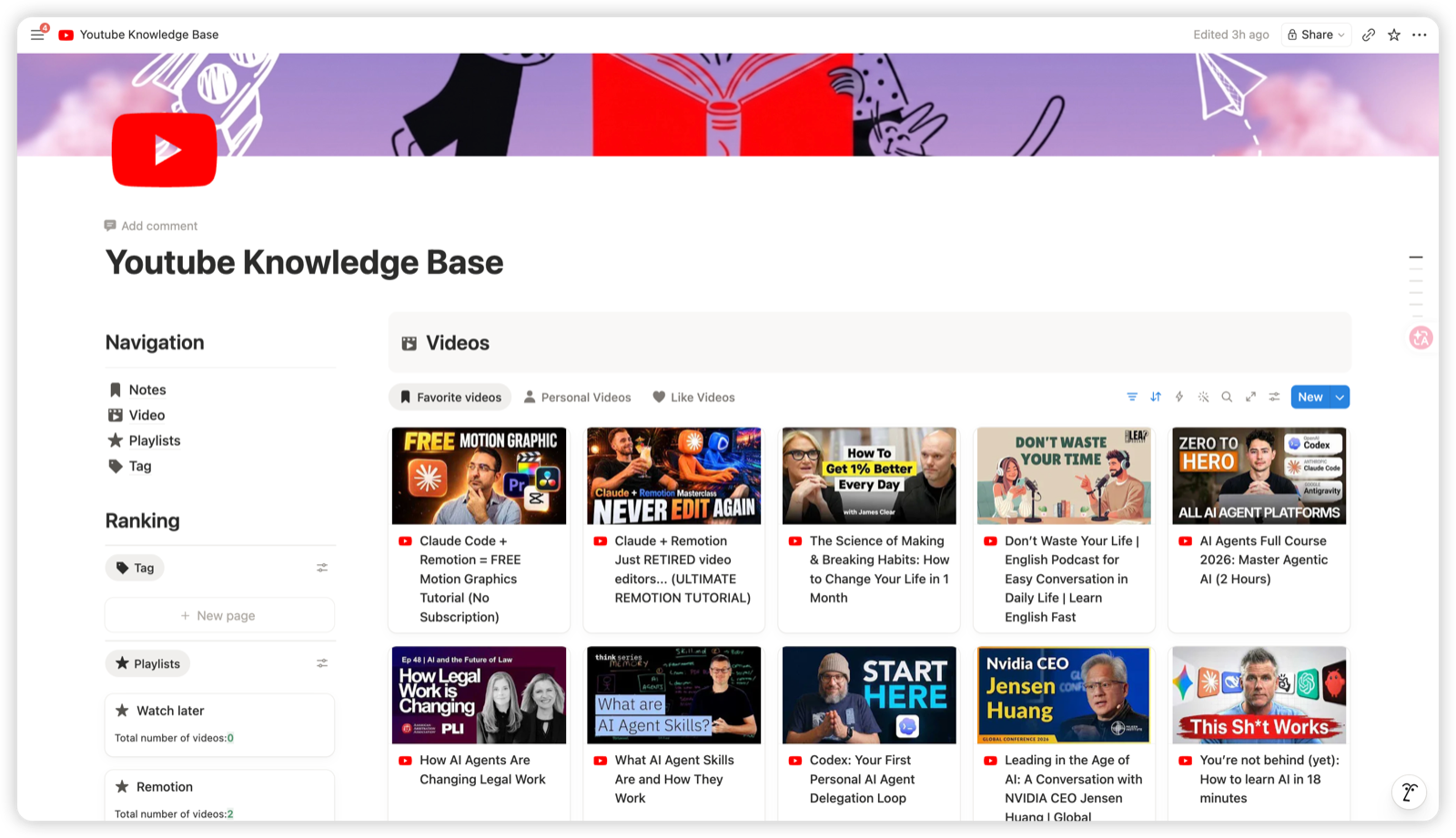
One-Click Automatic Sync
Sync liked videos and playlists to Notion in one click. New content syncs incrementally on its own, with no extra clicks.
Complete Video Details
Title, channel, view count, publish date, description, thumbnail, embedded player, and #hashtags are recorded in full—just as they are.
Transcript + AI Summary
Along with the full transcript, AI automatically distills a content summary, key-point outline, and standout quotes, helping you grasp the highlights fast and save watching time.
Simple, Clear Pricing
Sync 10 liked videos for free with the full feature set — upgrade to Lifetime for unlimited sync, one-time purchase.
Free
Try it first, no payment needed
Same features as Lifetime
- Lifetime updates + access
- Priority support
- Unlimited sync tasks
- Sync liked videos and playlists to Notion
- Full sync of title, channel, view count, description, thumbnail, and embedded playback
- Full transcripts + AI summaries (bring your own LLM)
- Multi-account support
Lifetime
Great for building a knowledge base
- Lifetime updates + access
- Priority support
- Unlimited sync tasks
- Sync liked videos and playlists to Notion
- Full sync of title, channel, view count, description, thumbnail, and embedded playback
- Full transcripts + AI summaries (bring your own LLM)
- Multi-account support
All plans work on Chrome and Edge. Not available on mobile.
Also from us: Clipno
Already syncing YouTube to Notion? With Clipno you can clip any web page, article, video, social post or PDF straight into Notion — one click.
Loved by Our Users
See what other users say about syncing YouTube to Notion.
“Finally I don't have to worry about liked videos getting deleted or lost! One click syncs everything to Notion—titles, channels, thumbnails, transcripts, all there—and I can organize by playlist. Building my own video knowledge base has never been easier.”
“The transcript + AI summary combo is incredible. For a one-hour interview, I read the summary in a few minutes to catch the key points, then dig into the transcript when I want details. Total efficiency boost.”
“I have two YouTube accounts, and after switching the extension automatically syncs the new account's content without mixing up the progress. Really thoughtful touch.”
“Set it once and it syncs incrementally on its own—newly liked videos land in Notion automatically with no duplicates. So much better than the manual copy-paste I used to do.”
Frequently Asked Questions
Answers to common questions about Youtube2Notion. Still have questions? Feel free tocontact us。
Why does nothing happen after I toggle the sync switch?
Why does nothing happen after I toggle the sync switch?
- Check whether https://api.notion.com/v1 is reachable. If it isn't, switch networks or use a proxy, then turn the switch off and back on.
- Make sure you're logged in to the YouTube website. If not, log in first.
- Check whether you've changed any properties or names in your copied Notion template. If so, restore the template or copy it again. After re-copying, you'll need to reconnect the Integration and update the Notion Page link in the extension settings.
Sync stopped after a while?
Sync stopped after a while?
- Check whether you've been logged out of the YouTube website. Log back in to continue. If you're still logged in, try refreshing the page.
- If YouTube reports unusual access, you may have hit a rate limit. Turn the switch off and try again the next day.
Will it sync a new account after I switch YouTube accounts?
Will it sync a new account after I switch YouTube accounts?
- Yes. After you switch to another YouTube account in the browser, the extension automatically detects it and prioritizes fetching and syncing the new account's liked videos and playlists.
- Each account's sync progress is independent. Switching back to the old account resumes from where it left off, with no duplicate syncing.
How do I sync from another device?
How do I sync from another device?
- Install the extension on the new device and enter the same Notion Secret and Notion Page as before.
- Note: if the old device has already synced, the new device needs some time to catch up to the old device's sync cursor.
How do I enable AI summaries?
How do I enable AI summaries?
- AI summaries require your own LLM API (such as OpenAI, OpenRouter, or any compatible endpoint).
- Just enter your API endpoint and key in the extension settings to enable it. Summaries are generated automatically in the video's original language.
The extension disappeared?
The extension disappeared?
- The extension is installed from the Chrome Web Store, so it normally won't disappear. If you don't see the icon, click the Extensions (puzzle) icon to the right of the address bar and pin Youtube2Notion to the toolbar.
- If you find it disabled or removed on chrome://extensions, just re-enable it; if it was uninstalled, reinstall it from the Chrome Web Store.
Start Syncing to Notion Now
Join countless YouTube viewers in turning video content into your Notion knowledge base—watch, organize, and search, all in one place.